This article is obsolote since September 2026. It's there only for archives
You are one of our customers for hosting of your website and/or emails ? You'll find here all technical parameters to configure properly your email software ou use Webmail, and also FTP access to update your web site.
Email Configuration:
In any cases, you always have access at your emails using the Webmail system. It's avalaible there:Webmail Domediaand you just need to use your login/pass of your mailbox (not the credentials for the management console).
Parameters needed are all listed below. You can access your mailbox either in IMAP or POP3 mode., but we strongly advise you to use it in IMAP mode. IMAP mode ensures permanent synchronisation of your mailbox between all your devices (which is impossible in POP3).
If you use a modern email software such as Thunderbird, you should not have to do manual configuration. Just indicate at Thunderbird the email address you want to configure and it'll find out automatically proper settings and you'll just need to confirm login and password of mailbox.
SMTP/POP3/IMAP server: mydomain.com (authentication is mandatory) (mydomain.com is to replace by your domain name without any www or anything else in front)
No connection without encryption is possible on our servers. You must activate options below:
SMTP: SSL/TLS or STARTTLS mode , (port 465 if needed in SSL9TLs mode, or 587 in STARTTLS mode), password mode: clear/normal
POP3/IMAP: SSL/TLS or STARTTLS mode, (port 993 if needed in SSL/TLS mode, or port 143 in STARTTLS mode), password mode: clear/normal
Username or login and password associated with are the ones you have received when mailbox has been created (you can also get list of all logins in the control panel (password can not be seen for safety reasons but can be resetted there)). Out of few exceptions your login is always in similar syntax customeridentifier.mailboxidentifier (don't confuse it with the email address itself that is like user@mydomain.com).
If you still don't succeed to get your mail software to work with your mailbox, please contact us by phone or email for a quick help and fix. No support will be given for Mail from Apple and Outlook from Microsoft softwares, these two softwares being worse emails clients that exist on earth !).
For Linux, Windows, Mac, and Android, we advise Thunderbird freely avalaible for download on that page:https://www.thunderbird.net/fr/For iOs (iPhone, iPad), we advise Airmail (commercial software).
FTP Setup:
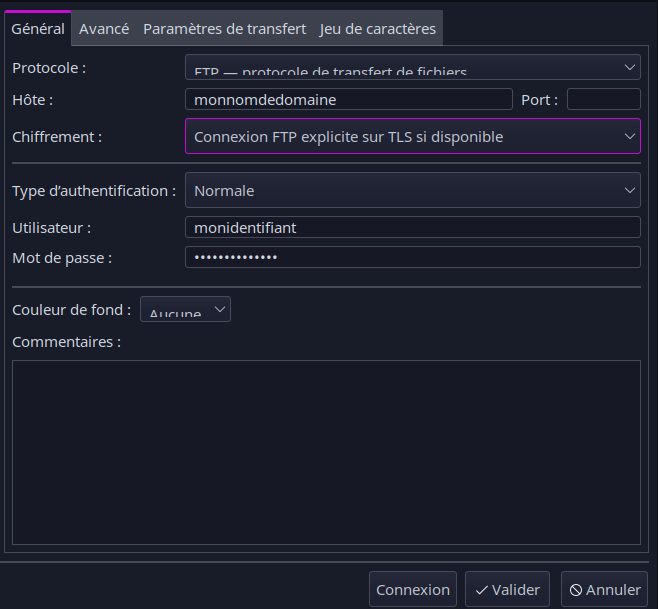
FTP access allows you to transfer files between our servers where your files are hosted and your computer. We strongly advise you to use open-source softwareFilezillathat is avalaible on all current platforms. Warning, for a good compatibility with our servers, you'll need to use version 3.48 or above of Filezilla.
Server name to use is your domain name (without any WWW or anything else in front) and protocol to use is FTP on TLS.
Your identifier is same as the one for the control panel and that has been sent to you when your account has been created (Warning: reseller user accounts for control panel can not be used for FTP, you still have to use FTP credentials of each individual hosting account).
Last update of that post: September 1st 2026